
If you have been following The Lancaster Blueprint, you know I am a big advocate for smart home systems that don’t just react—they think. For a long time, my blinds operated on basic, time-based schedules. It worked, but it required constant manual tweaking as the seasons changed. Today, I want to share how I evolved that setup into an advanced, automated system that manages my home’s climate based on real-world data like sun position and temperature.

The Foundation: Dedicated Hardware for Maximum Stability
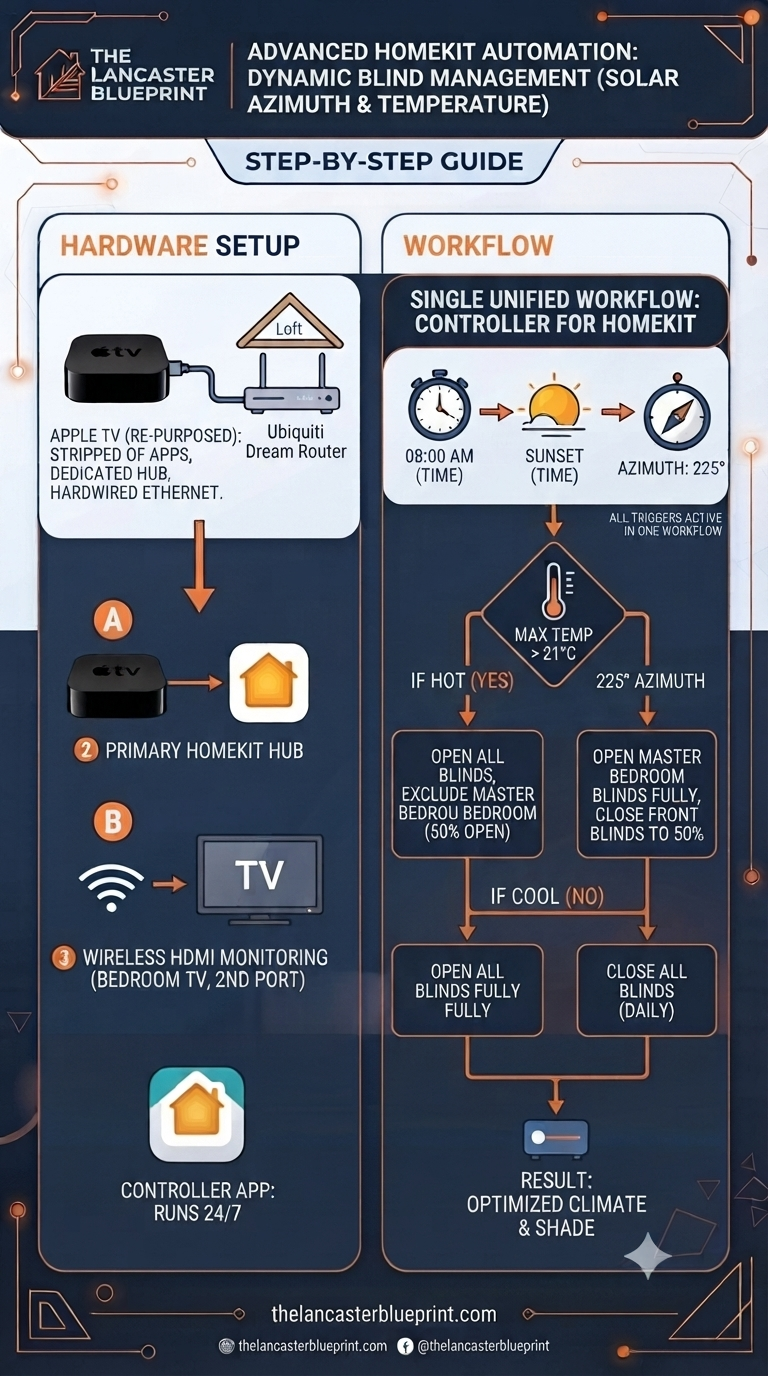
To run advanced workflows reliably, you need a robust setup. My solution was to repurpose an older Apple TV as a dedicated “brain” for my home.
The Hub: I moved my main Apple HomeKit hub to this specific Apple TV. To ensure maximum performance, I stripped all unnecessary apps off the box.
Stability: It is hardwired directly into my Ubiquiti Dream Router in the loft, eliminating any potential Wi-Fi interference.
The Controller: I use this box to host the Controller for HomeKit app. It stays open 24/7, tirelessly running the complex automations and workflows that keep the house running smoothly.
Monitoring: While it’s a “headless” setup for the most part, I have a wireless HDMI connector running to my bedroom TV. If I ever need to check the status, I just switch to the second HDMI port, and the interface is right there.
The Logic: Intelligent Workflow Management
The real magic happens in the software. Instead of juggling dozens of separate automations that conflict or drift, I consolidated everything into a single, comprehensive workflow within Controller for HomeKit.
This workflow uses three key triggers: 08:00 AM, Sunset, and the Sun’s azimuth (the compass position of the sun). Specifically, I focus on the 225-degree mark—the point where the sun moves from the side of my house to the front.
How it works:
Morning Routine: At 8:00 AM, the system checks the forecast. If the daily maximum temperature is expected to exceed 21°C, it opens all blinds except the master bedroom, which only opens to 50% to manage heat. If it’s a cooler day, it simply opens everything.
Solar Tracking (The 225° Azimuth Threshold): When the sun hits the 225-degree azimuth mark, the system takes action. On hot days (>21°C), it fully opens the master bedroom blinds while drawing the front blinds down to the 50% mark to provide shade and keep the house cool.
Sunset: Every evening, the system automatically closes all blinds.
Why This Changes Everything
Previously, I had to manually adjust my “close-time” settings throughout the year as the sun’s path changed. Now, I don’t have to worry about it. By integrating temperature and azimuth-based sun positioning, the system manages the house’s solar gain automatically.
It’s efficient, it’s intelligent, and it’s a perfect example of how you can use tools like Controller for HomeKit to move beyond simple schedules into true home automation.
Do you have an advanced automation setup in your home, or are you looking to bridge the gap between simple timers and intelligent workflows? Let me know in the comments below!